What’s inside the vault
Features
Designed to keep your keys offline · Built for Bitcoin self-custody
New Feature
Silent Payments (BIP-352) Now Supported
SafeKeepVault now generates and signs BIP-352 Silent Payment addresses — receive Bitcoin privately with a single static address that never repeats on-chain. Works perfectly with Sparrow 2.5. Fully air-gapped, no network required.
Architectural Security
SafeKeepVault boots directly into a hardened, air-gapped environment with all network interfaces disabled and no access to your host machine’s storage. Security isn’t a setting you configure — it’s the starting state.
Absolute Air-Gap — Total Network Isolation
SafeKeepVault locks down Ethernet, Wi-Fi, and Bluetooth before the system even fully starts. Your private keys are completely isolated and never have the chance to reach any network interface.
- Hardware Lockdown Non-essential peripherals are deactivated. The system communicates exclusively with your display, keyboard, camera, and the flash drive itself.
Zero-Footprint Operations — Host Integrity
SafeKeepVault operates in complete isolation from your computer's internal storage. Your hard drive is never mounted, read, or modified, ensuring your host OS remains untouched.
- Volatile Memory Execution By running entirely in RAM, all session data—including keys and clipboard history—is instantly purged upon shutdown. No traces are ever written to the local hardware.
Temporary or Encrypted Versatility — Persistent or Temporary
Choose your workflow for every session. Utilize the Encrypted Vault to securely store keys for recurring use, or run in Temporary Mode for using a different private key or multi-signature setup.
- Streamlined Authentication Access your encrypted storage securely and conveniently. Authenticate by scanning a secure QR code via your mobile device or through traditional password entry.
- Plausible Deniability Transform any standard PC into a signing station without specialized, branded hardware. To an outside observer, your vault is an indistinguishable, everyday USB flash drive.
The Arsenal
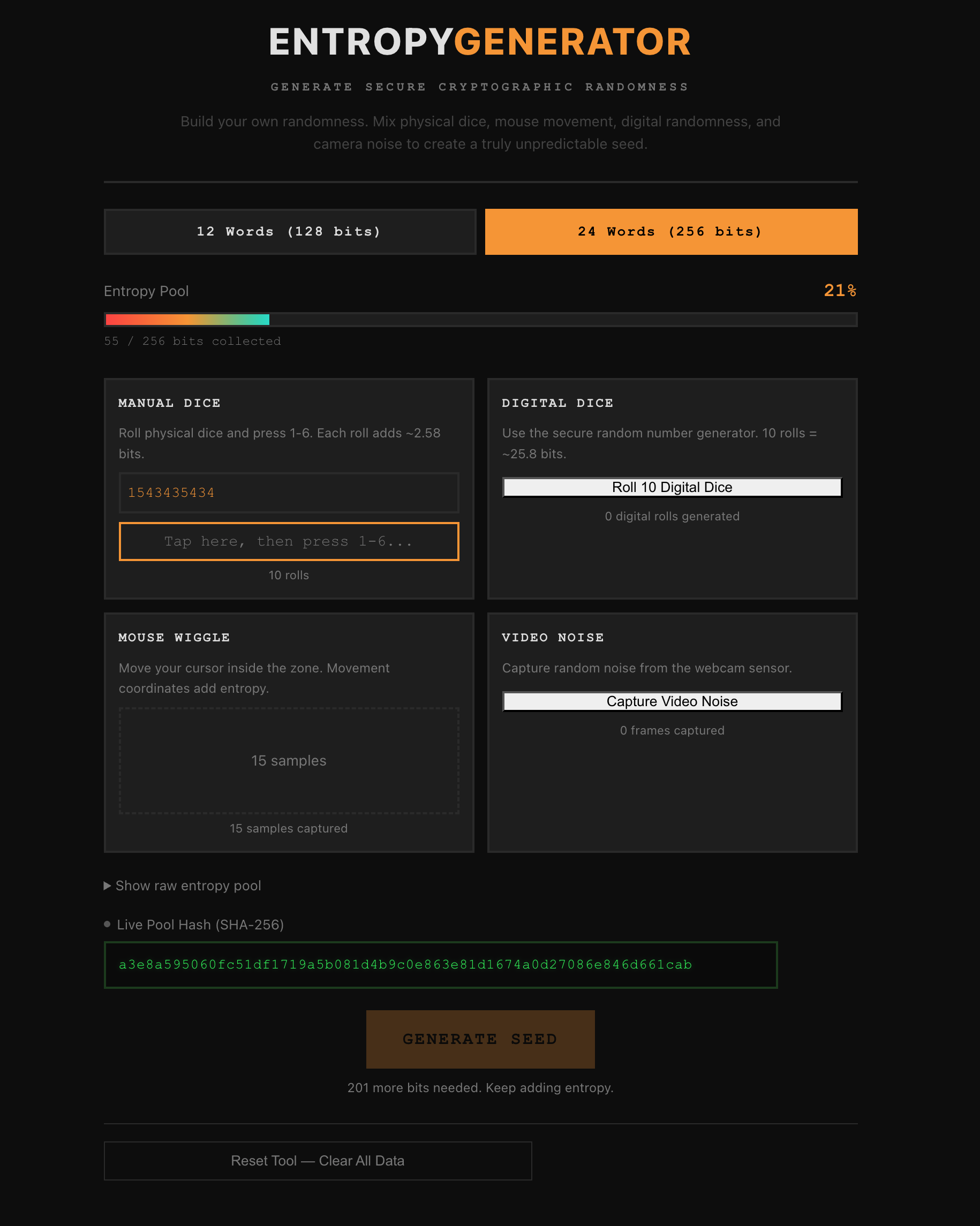
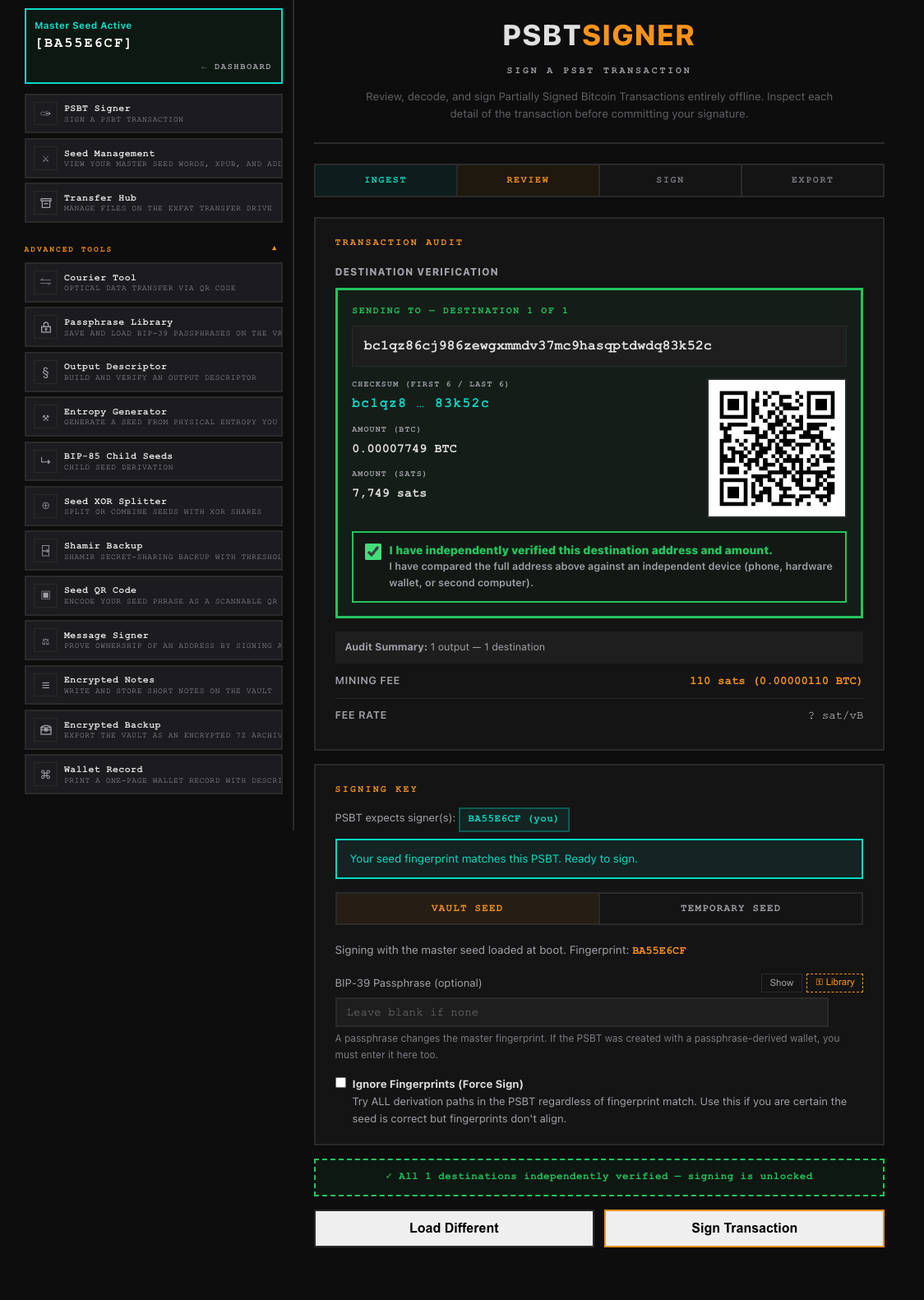
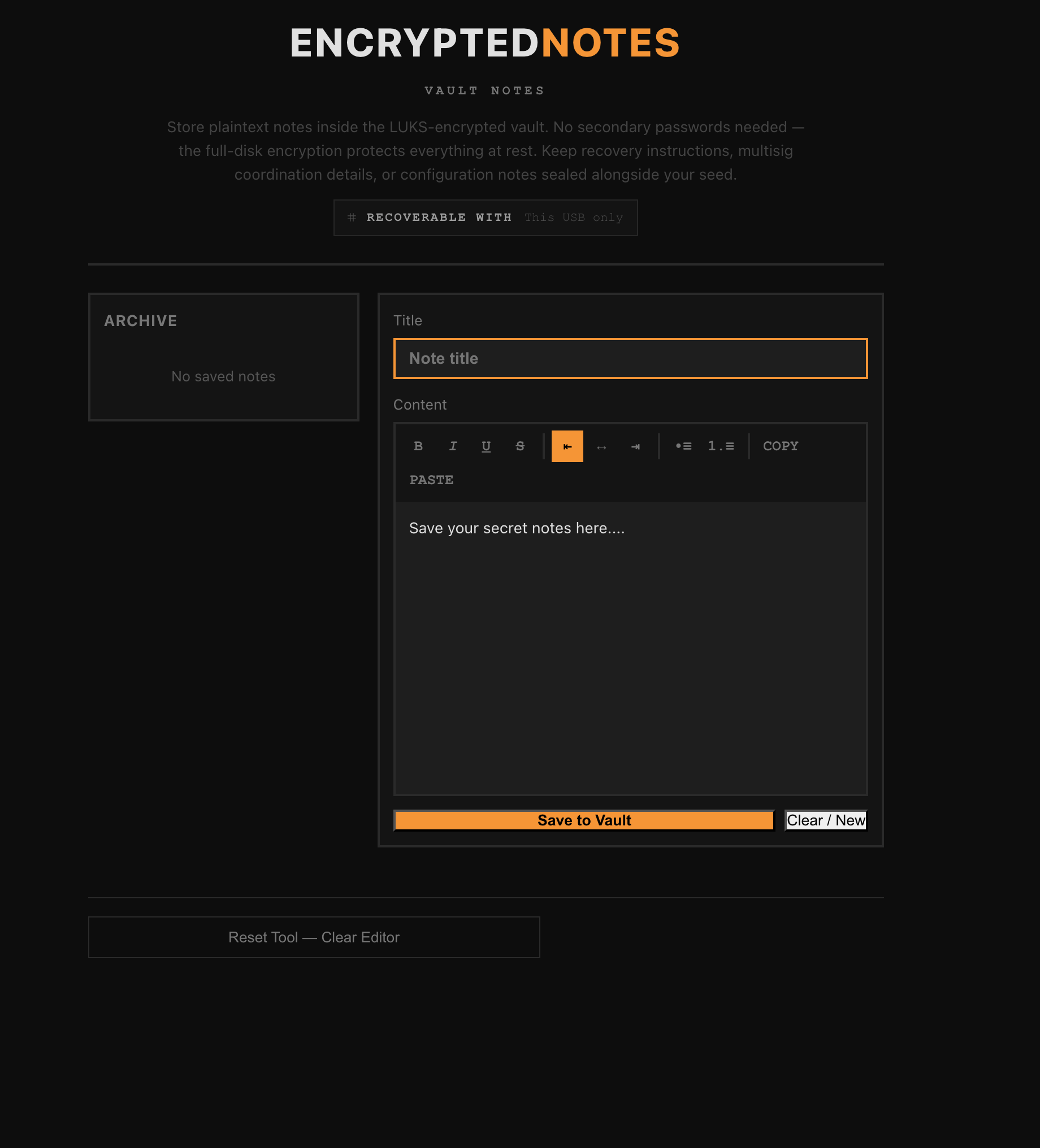
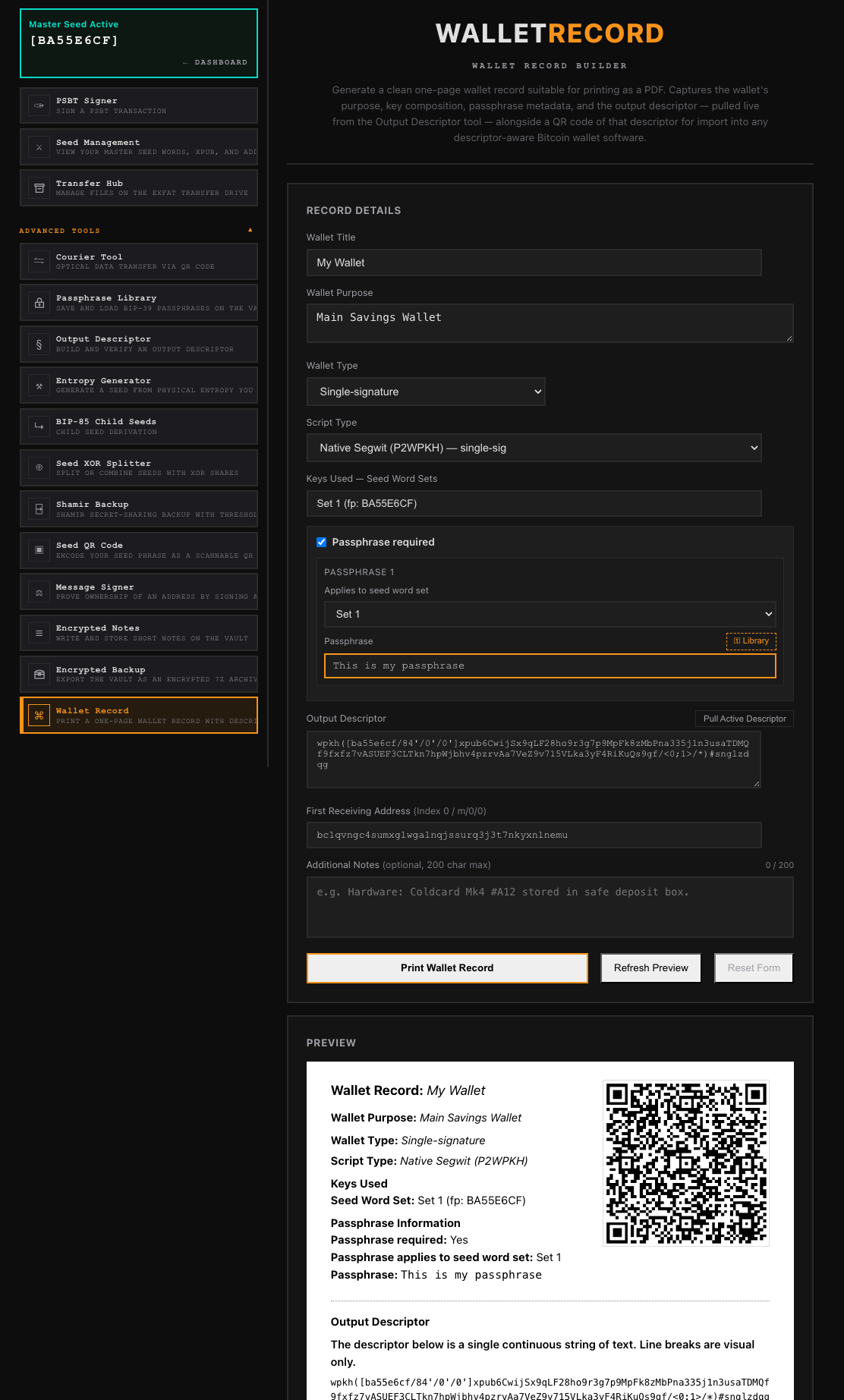
A comprehensive suite of sixteen specialized tools covering the entire Bitcoin lifecycle: generation, backup, sharding, derivation, signing, and inheritance planning. Every utility operates within a strictly air-gapped environment, producing standardized outputs compatible with any industry-standard wallet or coordinator.
- PSBT Signer
- Passphrase Library
- Seed Management
- Transfer Hub
- Courier Tool
- Output Descriptor
- Entropy Generator
- BIP-85 Child Seeds
- Seed XOR Splitter
- Shamir Backup
- Seed QR Code
- Message Signer
- Encrypted Notes
- Encrypted Backup
- Wallet Record
- 2FA Backup

Seamless Ecosystem Integration
SafeKeepVault acts as a secure shield for the wallet software you already use. While your regular wallet tracks your balances, SafeKeepVault keeps your private keys completely offline and out of reach.
To get started, export your public key information from SafeKeepVault and import it into your wallet of choice — like Sparrow, Specter, Electrum, Nunchuk, or Blue Wallet — to create a watch-only wallet. Your watch wallet can track your balance and transaction history in full without ever touching your private keys.
When it’s time to spend, your watch wallet builds the transaction and hands it off as a PSBT file. Move it over to SafeKeepVault by QR code or sneakernet, sign it while fully offline, and send it back to your regular wallet to broadcast. Your keys stay totally disconnected from the internet, exactly where they belong.
Advanced Multisig Coordination
SafeKeepVault is a first-class participant in any multi-signature setup. If you already own a Coldcard, Trezor, or any other signing device, SafeKeepVault works alongside it seamlessly — contributing one key in a 2-of-3 or larger quorum just like any dedicated hardware wallet would. No need to replace what you already have.
If you prefer an all-in-one approach, SafeKeepVault can also hold and sign with multiple keys itself. Load your primary key from encrypted storage, then temporarily bring in additional keys to meet the required threshold. Those extra keys exist only in volatile memory — the moment you finish or shut down, they are wiped completely and permanently, leaving no trace on the drive.
Native Compatibility
- Blue Wallet Export your public key to Blue Wallet and monitor your balance from your phone. Your signing keys never leave SafeKeepVault — Blue Wallet sees your funds, but can't touch them.
- Nunchuk Nunchuk handles transaction coordination and broadcasting from your phone while SafeKeepVault serves as your offline signing device. Scan the unsigned transaction, sign it on the vault, and send the result back — your keys never touch a networked device.
- Sparrow Wallet Use Sparrow on your desktop to track your balances and organize transactions. When it’s time to sign, Sparrow hands the job off to SafeKeepVault—keeping your keys offline while you move data back and forth using simple files or QR codes.
- Specter Desktop A natural fit for multisig-first setups. SafeKeepVault exports descriptors and PSBTs in the formats Specter expects, making it straightforward to coordinate complex signing arrangements without ever exposing a key to an online machine.
- Electrum Set up Electrum as your watch-only coordinator and use SafeKeepVault as the offline signer. Export your public key, track your balance in Electrum, and sign transactions on the vault when it's time to spend.
Download
Verify the signature against the maintainer's public key before writing the image to a flash drive. The verification guide walks through the procedure end to end.